

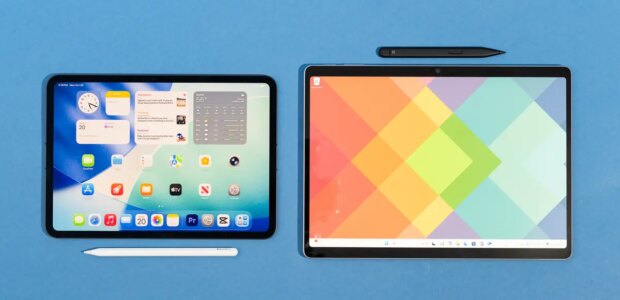

Dave Gershgorn/NYT WirecutterTop pickThe M5 iPad Pro has everything we want in a pro tablet, including a great display, laptop-level speed, and the best selection of apps.The Apple iPad Pro (11-inch, M5) doesn’t represent a huge upgrade over last year’s model in terms of specs, but a new processor, an updated operating system, and upgraded fast charging make this latest model the best pro tablet you can buy. After setting up, carrying around, and using five other tablets for a week, we found that using the iPad Pro felt like a true Goldilocks moment, as it offers the best combination of size, performance, display quality, high-quality peripherals, and support from a wide ecosystem of apps.The iPad Pro is best for people who want features that Apple doesn’t offer on less-expensive iPads, including a screen with a higher refresh rate for smoother motion and an anti-reflective coating, a faster Thunderbolt USB-C connection, and Face ID. The M5 iPad Pro has more processing power than any other iPad we’ve tested, and it’s the clear choice for people who want the best performance when they’re digitally sculpting, designing 3D models, creating animations, editing video, or doing other processor-hungry creative tasks.It’s as powerful as a laptop. The M5 iPad Pro has no trouble multitasking, and it manages to juggle lots of intensive tasks without slowing down. We started a 4K video editing project in LumaFusion, worked on a digital sculpture with 6 million vertices in Nomad Sculpt, and ran a Geekbench 6 benchmark, and we were able to swap between those tasks and a browser full of tabs without any slowdowns or stuttering. Across our tests, Apple’s M5 chip ranged from 10% to 30% faster than its M4 chip, increasing the most on GPU-hungry tests such as exporting video.Using multiple apps in iPadOS 26 is easier. The M5’s power boost is well-timed, as Apple’s redesigned iPadOS makes it easier than ever to use multiple apps on the tablet. Swiping down from the top of any app prompts the appearance of a small menu bar that includes Mac-style “traffic light” buttons for closing, minimizing, or windowing the current app. When the app is windowed, you can then open, window, and resize other apps to run next to it. Some multitasking features are immediately useful, such as pulling up a Safari window over your Mail app to quickly look something up or setting two apps side by side on the screen. However, you’ll have to experiment to find how you like to multitask on an iPad, as each app reacts a little differently to being windowed and resized. (Note that you don’t need a new iPad Pro to use the latest iPadOS features; iPadOS 26 is supported by every iPad made since 2019, though you need one with at least an M1 processor or an iPad mini with the A17 Pro chip to use Apple Intelligence.) Photographers and designers will appreciate the iPad Pro’s excellent OLED display. Dave Gershgorn/NYT WirecutterIts OLED display is bright and offers fantastic contrast. The M5 iPad Pro has the same tandem OLED display as the M4 model, which offers much better contrast in comparison with the LCDs used in other tablets. Instead of shining a backlight through an image, the OLED screen can change the brightness of individual pixels. The resulting difference in image quality is easiest to see while you’re watching a dark or moody movie, since OLED displays can individually dim or turn off pixels, giving the display a wider spectrum of darkness and shadow to show. The iPad Pro’s display is also impressively bright, though only when the automatic brightness setting is turned on: The iPadOS screen-brightness slider sets the display’s brightness to only about 500 nits, but when bright light hits the iPad Pro’s front-facing sensors, the automatic brightness setting increases the display’s output all the way up to about 1,000 nits. That’s about twice as bright as the iPad Air can get, and it reaches the brightness of some OLED TVs.Its App Store is easier to use and has better pro apps than other platforms. The App Store is available on any iPad, but the selection of apps available on iPadOS has more options for professional users than Android, especially for note-takers, artists, photographers, and video editors. Companies such as Adobe focus on apps for Apple devices and have discontinued their Android options. In contrast, the Microsoft Surface Pro can install any compatible Windows desktop app but lacks the processing power to fully take advantage of many of them.The webcam is best used in landscape mode, as you would on a laptop. Apple has moved the iPad Pro’s webcam to the center of the tablet’s right edge, where you’d probably expect it to be when using the iPad Pro like a laptop. This design change makes your video calls look a lot more natural, especially when you use the Magic Keyboard or another case that stands the tablet in a landscape orientation.It operates silently, and its battery lasts a long time. Unlike some laptops and Windows tablets we’ve tested, none of the iPads need a fan. Some parts of the tablet can get warm when you’re using it for long periods, but it will always be quiet no matter what you’re doing. Most people will have no problem getting the battery to last a full workday, and with light to medium use your iPad Pro can go multiple days between charges. The M5 iPad Pro is also the first iPad to have fast-charging, and with a compatible charger it can charge up to 50% in just 30 minutes.Its accessories, the Apple Pencil Pro and Magic Keyboard, are excellent (but sold separately). Apple has made some of the best iPad Pro accessories we’ve tested, such as the Pencil Pro stylus and Magic Keyboard, and the M5 iPad Pro supports them. These extend the iPad’s functionality, because you can’t really scribble or type as well on the device without some kind of accessory. The Pencil Pro is loaded with sensors to determine the stylus’ angle, its pressure on the screen, how close to the screen it is, and whether you’re squeezing or tapping it for additional controls. The Magic Keyboard is a straightforward keyboard case with a full set of function keys and a USB-C port for pass-through charging (though you have to take the iPad out of the case to use it in portrait orientation). But Apple’s accessories are expensive. We recommend excellent affordable third-party options in our guides to the best iPad Pro keyboard cases and the best styluses. Squeezing the barrel of the Apple Pencil Pro brings up a menu with helpful shortcuts. Double-tapping the Pencil Pro item still changes between tools, the same as on the second-generation Pencil. Dave Gershgorn/NYT WirecutterThe 13-inch size is better for multitasking and comparing documents. The 11-inch iPad Pro is the better choice if you’re using your tablet like a tablet, as a second device that you can use to write notes, quickly enter information, or read and annotate documents. However, if you’re planning to use your iPad like a laptop — that is, in landscape orientation in the Magic Keyboard case and with multiple applications open at the same time — the 13-inch version has enough space for documents and windows to remain open at a normal size. We found that multitasking similarly with the 11-inch iPad Pro felt a little cramped when we were working for extended periods of time. The iPad Pro’s camera contains a lidar scanner that can serve to measure distance or access augmented-reality apps. Dave Gershgorn/NYT WirecutterFace ID makes unlocking the tablet impressively convenient. The iPad Pro has a face-scanning Face ID camera to log you in, similar to those on iPhones; the process might take some getting accustomed to if you’ve used an older or less-expensive iPad with a Touch ID fingerprint reader integrated into its home button or power button, but Face ID was quick and accurate in our testing. The Pencil Pro is nearly identical to the second-generation Apple Pencil but adds more sensors. A squeeze feature opens an on-screen menu. Dave Gershgorn/NYT WirecutterFlaws but not dealbreakersIt’s still best as a secondary device, not a laptop. Many people use the iPad Pro as a primary device, but even with the iPadOS 26 multitasking features, many computer tasks are still easier to do on a traditional desktop. Any kind of work that involves spreadsheets or requires precise mouse clicks or specialty software that’s unavailable on iOS is difficult on an iPad. But for more general tasks, such as sending email, typing documents, scheduling, or even doing video calls, the iPad Pro is more than capable.It isn’t great for coding. Apple doesn’t allow coding apps such as Xcode or Visual Studio in the App Store, and even third-party web browsers on the iPad need to use the same rendering engine that Apple uses for Safari, so the iPad is a bad choice for coding apps or testing web pages. (There is Swift Playgrounds, but it’s more of an educational tool than a serious code editor.)It isn’t user-repairable. There are no repairs you can perform yourself on the iPad Pro. If you don’t have AppleCare+, Apple’s extra warranty coverage, getting it repaired can cost up to 85% of the tablet’s price. (Our top pick for Windows users lets you replace the SSD yourself.)It has no headphone jack. We don’t like that the iPad Pro omits a standard 3.5 mm headphone jack, something that’s still included on many Windows tablets and Apple’s own MacBook lineup. Either you need to get a dongle to use existing headphones or you need to switch to Bluetooth headphones.Readers also likeThe Best Bluetooth Wireless HeadphonesThe JBL Tour One M2 over-ear Bluetooth headphones sound great, have a long battery life, and offer premium features at a lower price than the competition.
Source link