

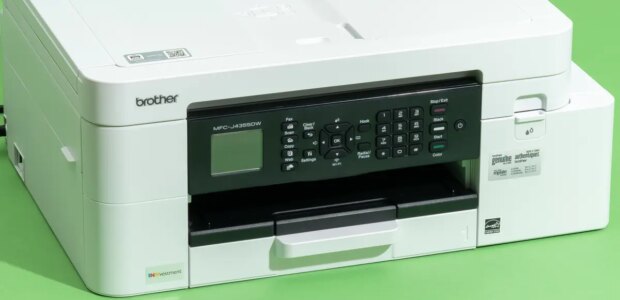

Michael Murtaugh/NYT WirecutterTop pickIf you need a basic color printer that can also scan and fax, this inkjet printer is a good option. It’s relatively inexpensive and capable of handling a variety of jobs.Who this is for: This is the printer to get if you don’t have big productivity demands and need a cheap multifunction printer with solid performance.Why we like it: Priced at about $200 at this writing, the Brother MFC-J4355DW is one of the most affordable models we’ve tested, and it doesn’t gouge you with high printing costs in exchange. It prints with a sharpness that rivals the results from many laser printers, and it does a stellar job of printing glossy photos.Like most printer makers, Brother offers different types of ink refills with different capacities. While the highest-yield cartridges cost more than the printer itself (about $250 at this writing), you save a bundle in printing costs: They’re good for up to 5,000 black-and-white pages or 2,500 color pages per set, which translates to per-page costs of roughly 1.5 to 1.7 cents for monochrome (with a single cartridge or a twin-pack) and 8.2 cents for color.You can avoid the high up-front cost of replacement cartridges by joining Brother’s Refresh EZ Print subscription at $2.50 to $30 per month. With this delivery service, you pay based on how much you print, and it also extends the two-year limited warranty by another year.You’ll need to print a lot in color to make a subscription worth the expense on a pure cost basis, though. The program charges a flat rate per page, which means the per-page monochrome print prices are actually higher than what they are if you pony up for ink à la carte. However, the convenience of home delivery, combined with the extended warranty and minimal up-front costs, may make the subscription worth investing in for some people.Regardless of the ink source, our test prints from the MFC-J4355DW looked great. It reliably printed sharp text down to 4 points in sans serif fonts, rivaling the output of laser printers such as the DCP-L2640DW. Images also looked great: Glossy photos exhibited realistic sharpness, saturation, and contrast that compared well with results from inkjets twice the price.Flaws but not dealbreakers The Brother MFC-J4355DW balances its large LCD screen with a dizzying array of navigation buttons that make the machine harder to set up than printers with touchscreens. Michael Murtaugh/NYT WirecutterInstallation takes time. Overall, in our tests this printer’s setup took about 20 minutes, while the Canon models we tested were up and running in 15 minutes, and the HP 9125e took just 10 minutes.The control panel is clunky. This inkjet has a backlit, 1.8-inch LCD screen that’s easy to read. But the non-touch screen is paired with an archaic push-button control panel.It’s noisy. The MFC-J4355DW is the only printer we’ve tested that makes a whistling sound like air escaping from a balloon during printing; we attribute the sound to the carriage rail and motors shifting during printing.Its scans look flat. Don’t expect the MFC-J4355DW to produce a carbon copy of your favorite photos. In our testing, this printer overcompensated in its scans by adding too much contrast, destroying detail in darker areas. Scanned color documents and reports also looked dull and lifeless.Key specsDimensions: 17.1 by 13.5 by 7.1 inchesWeight: 19.6 poundsPages per minute (stated): 20 monochrome, 19 colorCost per page: 1.5 cents for black, 8.2 cents for colorLearn more in our full guide to the best all-in-one printer.
Source link