

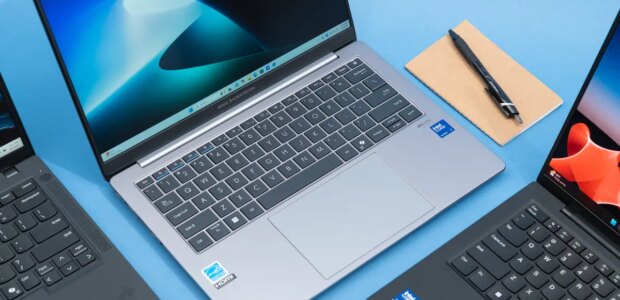

Dave Gershgorn/NYT WirecutterTop pickThe ExpertBook P5 has a slimmer design, a better screen, and longer battery life than the competition, and it’s designed to be repaired.Key specsProcessor:Intel Core Ultra 7 258VStorage:512 GBGraphics:Arc 140V (16GB)Screen:2560×1600 IPSMemory:32 GBWeight:2.78 poundsTested battery life:16.4 hoursDuring our testing, we found ourselves coming back to the Asus ExpertBook P5 again and again. While its processing power is on a par with that of more expensive laptops, it’s lighter, and it has a longer-lasting battery, a bigger trackpad, and a higher-resolution screen. Those are all aspects that business laptops have traditionally traded away for cost reasons or easier repairability, but the ExpertBook P5 seems to have it all — except for slotted RAM.It’s powerful enough for working on multiple projects at once. We recommend the version of the ExpertBook P5 with Intel’s Core Ultra 7 258V processor, which also powers three other laptops we tested for this round. We opened 50 Chrome tabs and ran a few work applications without experiencing any freezing or stuttering.Its screen is better than those of competitors for reading small text. The ExpertBook P5’s 2560×1600-pixel display is higher resolution than the screens of other laptops in the same price range. Thanks to that additional resolution, you can use Windows’s scaling feature to make menus and text on screen smaller while still being able to see and read them; doing so helps with multitasking, and in addition, text generally looks sharper when you have more pixels.The ExpertBook P5 has a fingerprint reader on the power button, as well as a large, comfortable trackpad. Dave Gershgorn/NYT WirecutterThe ExpertBook P5’s right side has one USB-A port and a Kensington security slot. Dave Gershgorn/NYT WirecutterMost of the ExpertBook P5’s ports are on its left side, including HDMI, USB-A, USB-C, and a headphone jack. Dave Gershgorn/NYT WirecutterThe ExpertBook P5 has a fingerprint reader on the power button, as well as a large, comfortable trackpad. Dave Gershgorn/NYT WirecutterIt has a long-lasting battery. The ExpertBook P5 lasted 16 hours 27 minutes on average during our battery test, which continually simulates web browsing until the computer’s battery dies. Those results surpassed what we got from nine of the 13 laptops we tested, which typically lasted 11 to 14 hours.Its trackpad and keyboard are comfortable to use. The laptop has a standard chiclet-style keyboard that includes a nifty feature to toggle the function row between the Fn layer and the F1 through F12 keys. It also has a fingerprint scanner on the power button. The right Ctrl key has been replaced with a Copilot key, which quickly pulls up a window to chat with Microsoft’s AI assistant, but it’s just as easy to ignore as the right Ctrl button if you don’t want to chat with your computer. The ExpertBook P5 also has a large trackpad — about the same size as the MacBook Air’s — that gives you a lot of room to swipe and use trackpad gestures. Many other business laptops, especially those from Lenovo, have smaller trackpads.It can connect multiple USB-A accessories at once. The ExpertBook P5 has two USB-C Thunderbolt 4 ports, two USB-A ports capable of 10 Gbps, an HDMI 2.1 port, and a headphone jack. Thanks to the HDMI 2.1 port, you can connect an 8K or 10K display (if that’s something you do on a regular basis) or output 4K at 120 frames per second. The two USB-A ports allow you to plug in both a mouse and a keyboard or their respective wireless dongles.It’s light and thin. The ExpertBook P5 weighs 2.8 pounds and measures less than three-quarters of an inch thick, so it’s slim enough to slip into a backpack or large purse. It also has a durable aluminum casing, which doesn’t add much weight.Most of its components can be repaired or replaced. Asus has a publicly available repair manual and sells parts for direct purchase and through third-party retailers.Asus provides a one-year accidental-damage warranty. The company’s Accidental Damage Protection program covers damage from dropping your laptop or spilling liquid on it, as well as electrical surges. Asus also includes a three-year warranty that covers the display and internal components such as RAM, if the laptop breaks during normal use.Flaws but not dealbreakersIt has annoying webcam software. When you use the ExpertBook P5’s webcam for the first time, you’ll see a digital watermark on your screen with placeholder introductory information. This feature puts your name and title on your video during a presentation, and for some reason Asus decided to turn it on by default with no directions for how to change it. To turn it off, click the Asus AI ExpertMeet icon in the Windows System Tray and disable Webcam Watermark.It doesn’t have slots for replaceable RAM. Many laptop manufacturers, including Asus, have decided to solder RAM to the motherboard, because such a design decreases the thickness of the laptop. Only a handful of laptops still have RAM slots. Though RAM can fail, we don’t think that potential completely negates all the other aspects of the laptop that could also break but are repairable.
Source link